Character Lens
A solo portfolio app. Draw a Chinese or Japanese character with a finger and get a dictionary card from an offline database. A separate AI card adds an explanation, labeled and partly checked.
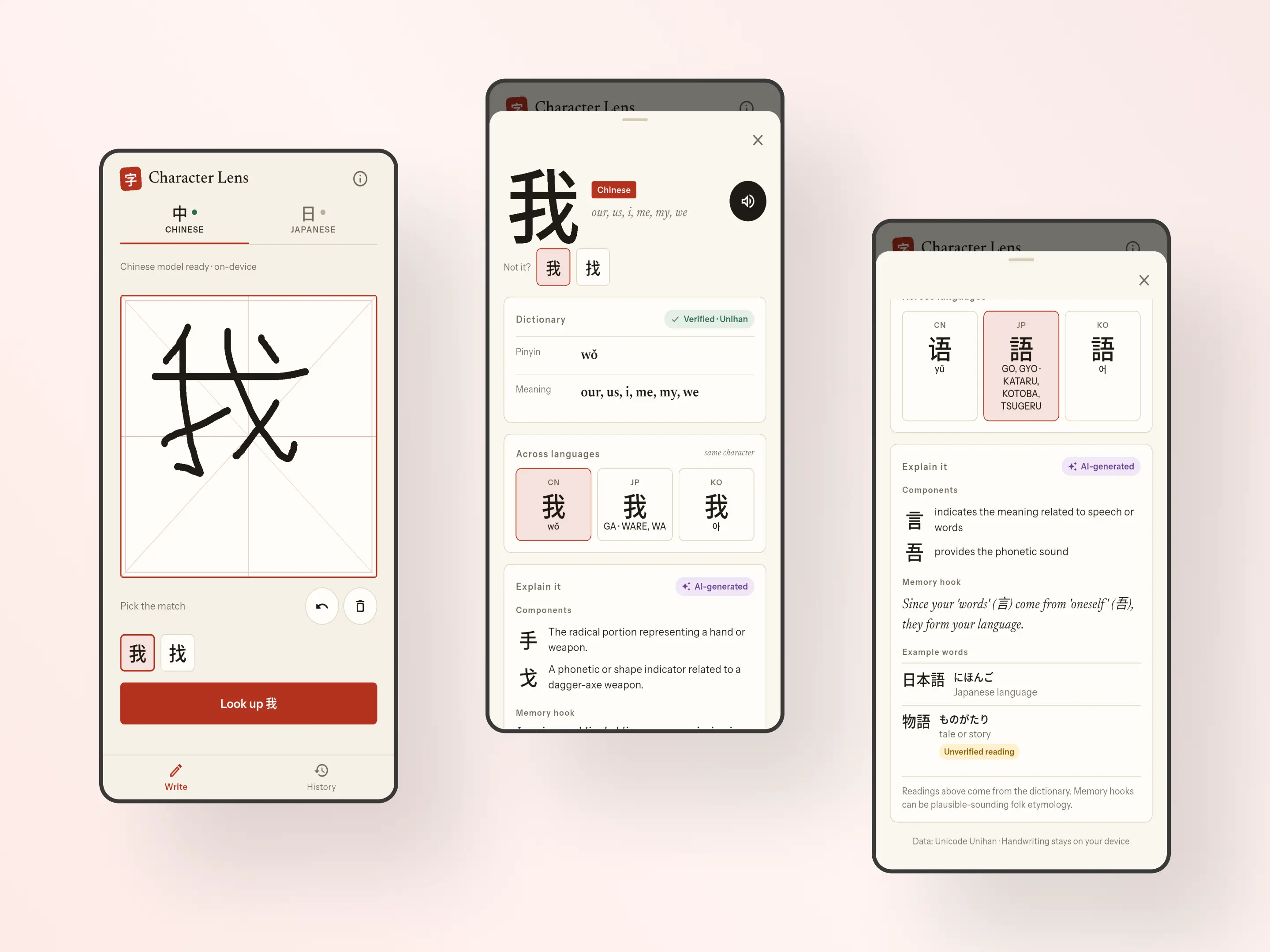
Overview
Character Lens is a portfolio project that I built alone and am still working on. People see Han characters on signs and menus and cannot type them into a translator, because they do not know the sound. Here you draw the character instead. It runs on Android and has only been tested on an emulator. There is no iOS build and no store release.
The problem
A language model can write a good memory hook for a character, and it can also state a wrong reading with full confidence. A wrong reading is worse than no reading. I needed the model to help without being the source of truth, and handwriting input had to stay private.
What I built
I wrote the spec, the app, the dictionary build script, the tests and the CI.
1. On-device handwriting recognition
Google ML Kit Digital Ink, with one model per language. Candidates are filtered to single characters in the dictionary, then capped at five.
2. Offline dictionary from Unihan
A script builds a SQLite file of 60,183 characters from Unihan 18.0.0. It adds 3.22 MB to the app.
3. Grounded AI explanation
Gemini through Firebase AI Logic with App Check, so the app holds no API key. Example readings are checked against the dictionary.
4. Architecture, tests and CI
Three layers, sealed Riverpod states and typed failures. 630 tests run in GitHub Actions.
Architecture and trade-offs
Strokes stay on the device
I decided early that strokes never leave the phone. That ruled out server-side OCR, which needs a network call and a key for every lookup. ML Kit sits behind an interface, so the engine can be swapped. I did not benchmark other engines.
Three layers
Screens and controllers are in features, plain Dart is in domain, and the implementations are in data. Only main.dart knows the concrete classes, so tests swap them for fakes. Each concern has a sealed state class, and the lookup state is the one the others listen to.
Architecture docThe dictionary is the source of truth
Readings and meanings come only from a bundled Unihan database. It has gaps: 22,186 of the 44,355 characters with a Mandarin reading have no definition. I left the gaps visible and did not fill them with model output.
ADR 002: Unihan dictionaryThe AI gets its own card
The dictionary card appears first and never waits for the model. The model gets the dictionary entry, must answer in a JSON schema, and gets one retry. Answers are cached per character, language and prompt version, so each character costs one call.
ADR 005: grounded LLMA loose validator that flags
Unihan has no word dictionary, so the check is loose. An example reading is verified if it contains a dictionary reading of the character. This flags some correct readings, like 物語, and can pass a made-up one. I flag instead of hiding, so verified means the dictionary does not disagree.
What I did not measure
No formal evaluation was run. I found a wrong usage note on the 学 card by reading it, because only example readings are checked. Everything ran on an Android emulator.
Case study on GitHubSystem design
Layers and dependencies
- canvas
- result
- history
- RecognizeCharacters
- ResolveCharacter
- ExplainCharacter
- ListHistory
- InkRecognizer
- Dictionary
- Explainer
- ExplanationCache
- MlKitInkRecognizer
- SqliteDictionary
- LlmExplainer
- SqliteExplanationCache
- FlutterTtsService
main.dart is the only file that names the data classes. It wires them into the domain interfaces, and tests wire in fakes instead.
From strokes to result
- StrokesCanvas
- ML KitOn-device model
- FilterOne character, in the dictionary, max 5
- Dictionary lookupBundled SQLite
- Result sheetDictionary card first
All on the device. The network is used once, to download each language's model.
The AI card
- Dictionary entry
- Cache checkCharacter, language, prompt version
- GeminiJSON schema, one retry if invalid
- Cache write
- ValidatorMarks unverified readings
- AI-generated card
Starts after the dictionary card is on screen. Only the character and its entry are sent, never the strokes.
Outcomes
- 630
- Tests
- Domain rules, SQLite, controllers and widgets.
- 95.9%
- Line coverage
- Of the files the tests load. ML Kit and Firebase adapters are not counted.
- ~55 ms
- Median recognition time
- Android emulator, range 34 to 144 ms.
- 3.2 s
- Median AI call, release build
- 10 calls on an emulator, range 3.0 to 8.7 s. A second run on a poor network was 6.2 s.
Key Features
- Drawing canvas with undo, clear and automatic recognition
- Dictionary card with the same character across Chinese, Japanese and Korean
- Pronunciation with the voices installed on the device
- AI explanation in its own labeled card, with unverified readings marked
- Explanations cached per character, language and prompt version
- History of the last 50 characters, reopened without a network
Gallery & Mockups
Let's talk
Open to remote full-time and freelance work. I'm based in Tangerang, Indonesia (WIB, UTC+7) and reply within 24 hours.
I also take freelance projects. See freelance work